Wednesday, October 13, 2010

Home Directory Data Usage

One of the neat things that you can do with Varonis DatAdvantage is monitor how much disk space your users' home directories are taking up. If you are like most organizations where all of the home directories are stored in a common directory on the file server, this is a snap.

Using the 4f report - "File System Objects List" create a report with two filters.
  • The first is: "Access Path" and should be set to the top level folder that contains the users' folders; such as "D:\home."
  • The second is: "Directory Depth" and should be set to 3 so you capture each user's folder on a separate line in the report; such as "D:\home\auser."

Then click on the "Extended Properties" tab and select the "File count" and "Total size in MB" options. Sort, the report on "Total size in MB" and away you go.

This will generate a list of all of the home directories with their associated disk usage, allowing you to identify users who are taking up an inordinate amount of disk space. Save this report to a spreadsheet and run this on a periodic basis and you will be able to track usage trends.

Tuesday, September 14, 2010

Slap on the wrist for Russian Hacker in RBS Case

Unfortunately, the Russian authorities only handed out a suspended sentence for Viktor Pleshchuk, one of the hackers who broke into the systems at RBS WorldPay Inc. They stole approximately $9 million from 2,100 accounts and Viktor essentially got off scot free.

Several inherent problems are revealed in this decision. First, the United States has no extradition treaty with Russia for these types of crimes. Since a large number of attacks originate from Russia, this is something that the State Department should be working as one of the top priorities in Obama's efforts to improve cybersecurity. If we cannot punish the bad guys, all of the reports and committees are of little use. Second, according to the story on Bloomberg, his lawyer's statement that “This is not a regular crime but a cybercrime and Pleshchuk didn’t really have a full understanding of the damage he was causing,” is comical.

These type of criminals hurt thousands of people on a daily basis and need to be severely punished.

Sunday, July 25, 2010

Where are AD Groups Used?

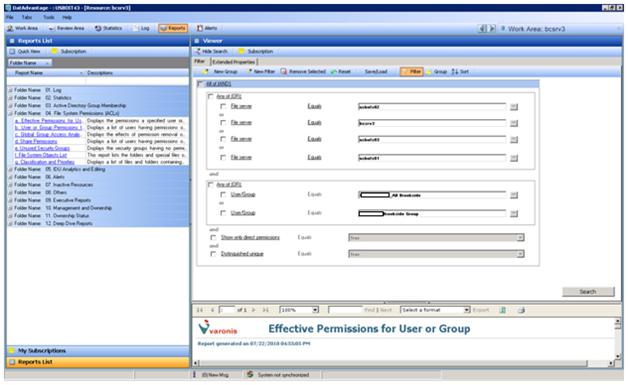
Utilizing Varonis DatAdvantage, one can determine how an Active Directory group is being used on a file server. To find where a security group is applied to a folder directly, run the 4a – Effective Permissions for User or Group report. You need to select each File Server that you want Varonis to investigate and since we are only interested where the group is in the “ACL” there are two options that need to be selected and set to True:
  • "Show only direct permissions"
  • "Distinguished unique"


This allows you to see every folder where the security group is directly applied.

Tuesday, July 6, 2010

Dealing with the CounterACT "Port Scan - SNMP" message

One of the challenges in managing the ForeScout CounterACT appliance is to deal with and clean up the false positives that arise from anomalous network behavior that is not malicious. For example, today, we received a set of errors from one particular server, 192.168.111.18, that indicated that it was performing SNMP port scans. ForeScout correctly detected that something unusual was occurring and classified it as a malicious event.

Every several hours the server was performing SNMP port scans on IP addresses that were no longer existed. What was causing these scans?


Upon further investigation, they were IP addresses for printers that had been moved and given new IP addresses. By running regedit and searching for one of the IP addresses we were able to determine that it was a printer that the server was looking for.

We went into the Control Panel, selected the printer in question, assigned the LPT1 port to the printer, deleted the old port, and then deleted the print queue. The problem was solved and another false positive was eliminated. Thanks John!

Wednesday, June 30, 2010

Warning - You Have Received a PDF file

With recent spate of vulnerability disclosures in the Adobe Reader and Acrobat programs it is time to take a big picture look at the PDF (Portable Document Format) format. The first observation that I make is that the PDF is not a strictly a static file; because of its potential for embedded JavaScript actions, it is an executable program. Since it is an executable program it needs to be treated as such from a security perspective. We need to have virus scanners aware of the executable functions within PDF files and warn us or inoculate us against the executable code that exists in the format.

Most people assume that a PDF file is a safe, immutable way to save and transmit unstructured information. Unfortunately because of the ability to create forms and JavaScript actions the PDF file has moved far beyond that; which is why the format has become so vulnerable to hackers. One solution that would stop this problem in its tracks would be for Adobe to create two different formats (PDF and PDX for example) and remove the JavaScript capabilities from the core PDF format. Until that happens we need to be wary of PDF files and take some of the following steps:

  1. Educate the user community that PDF files are inherently unsafe and should be treated with caution

  2. By default, disable the functionality to run JavaScript within Adobe Reader and use it only as an exception.

  3. Make sure that we have prevention tools in place to detect rogue PDF files.

  4. Make sure that we have deployed detective controls to notice when unusual behavior is taking place on a user’s workstation or on the network so that we can fight off the PDF-borne attacks.

For those who are interested in the latest patches, Adobe issued updates yesterday for Adobe Reader and Acrobat that deal with the Critical security issues that have been discovered in the current release 9.3.2 (and earlier versions). Here is the security bulletin from Adobe with links to version 9.3.3 of the software products.

Saturday, June 26, 2010

SQL Server Job History

In running Varonis DatAdvantage there are times when you want to look at the history of the nightly jobs for a longer period then the defaults provided by SQL Server 2005. These defaults are based on 'Maximum job history log size (rows)' and 'Maximum job history rows per job.' If you are monitoring a large number of servers than the system may only keep several days worth of history for each job. Where disk space on the SQL Server is not an issue one change the the delete option to purge data based on an overall duration, which can be specified in days, weeks or months. For example, we might want to retain 10 days worht of history to assist in debugging issues. To do that perform the following steps.


First run SQL Server Management Studio.

Then navigate to:
• Root
• SQL Server Instance
• SQL Server Agent
• Right click on SQL Server Agent


  • From here right-click on history.
  • Select the option to "Automatically remove agent history" and enter the duration that you want to keep the job history.
  • Click on OK and you are ready to run.

Wednesday, May 5, 2010

Justice Prevails

The recent convictions of the Sarah Palin email hacker, David Kennel, and the San Francisco system administrator, Terry Childs, are welcome events in the history of cyber crime.

These transgressions are not victimless; they affect everyone. One of the beauties of the Internet is its openness. That openness is only works if people feel safe on the Internet. When individuals take advantage of that freedom by abusing their privileges or infringing on the rights of others, it harms all of us by whittling away at that trust.

The Internet has revolutionized the way we live and that can only continue when people who violate the laws involving computer usage are punished severely.